Introduction
Lumina is the animation engine for the AI era: declarative by design, GPU-capable by architecture, and runnable everywhere humans and machines need motion.
You write a JSON scene file — objects, their properties, and a timeline of keyframes — and Lumina evaluates that timeline, applies easing, and rasterizes the result to video or to a live canvas. There is no imperative API to misuse and no GUI to learn. Because a scene is pure data, an LLM can write one, a validator can check it, and the engine renders it deterministically: same input, same pixels.
Why it exists
Existing animation tools each have a structural mismatch with how software is built today:
- Imperative APIs require stateful reasoning that LLMs hallucinate.
- CPU-bound renderers struggle with complex math scenes.
- No single format runs both offline (video) and online (interactive).
- LaTeX/math rendering is usually bolted on as an afterthought.
Lumina addresses these with one coherent architecture: a declarative, validated, open JSON format (LSF); a backend-agnostic renderer (CPU tiny-skia + GPU Vello); first-class text/LaTeX; image/SVG/GIF compositing; and a headless server for programmatic use.
What you can build
- Educational math/physics explainers rendered to MP4.
- Live, interactive visualizations embedded in the browser via the JS SDK.
- AI-generated animations validated and rendered server-side or from Python.
Read on to get started in about a minute.
Getting Started
Prerequisites
- Rust (latest stable, via rustup)
- FFmpeg for MP4 export (
apt install ffmpeg/brew install ffmpeg) - A TTF font for text rendering (e.g.
fonts-liberationon Ubuntu). The example scenes reference Debian/Ubuntu font paths — on macOS/Windows, substitute any local TTF path (seeexamples/README.md).
Build
git clone https://github.com/SakarZaidan/lumina.git
cd lumina
cargo build --release
Render a scene
# MP4 video
./target/release/lumina-cli --scene examples/unit_circle.lsf --output unit_circle.mp4 --format mp4

# PNG frame sequence (no FFmpeg needed)
./target/release/lumina-cli --scene examples/hello.lsf --output frames/ --format png

# WebM (VP9) or GIF, on the GPU backend
./target/release/lumina-cli --scene examples/showcase_grand.lsf --output reel --format webm --backend vello
Useful flags:
| Flag | Effect |
|---|---|
--backend skia|vello | CPU rasterizer (default) or GPU rasterizer. |
--format png|mp4|webm|gif | Numbered PNG sequence, or encoded video (mp4/webm/gif need FFmpeg). |
--watch | Re-render a preview frame whenever the scene file changes. |
--verbose | Print render timing at the end. |
Your first scene
{
  "version": "1.0",
  "meta": { "title": "Fade In", "author": "you", "created_at": "2026-05-25" },
  "canvas": { "width": 1280, "height": 720, "fps": 60, "duration": 2.0, "background": "#0F0F1A" },
  "assets": { "fonts": [{ "id": "sans", "path": "examples/assets/fonts/LiberationSans-Regular.ttf" }] },
  "objects": {
    "title": { "type": "Text", "properties": { "content": "Hello, Lumina", "x": 640, "y": 360, "align": "center", "font_id": "sans", "font_size": 96, "color": "#FFFFFF", "opacity": 0.0 } }
  },
  "timeline": [
    { "time": 0.0, "object": "title", "state": { "opacity": 0.0 }, "easing": "linear" },
    { "time": 1.5, "object": "title", "state": { "opacity": 1.0 }, "easing": "ease_out_cubic" }
  ]
}
Other entry points
- Python:
pip install maturin && (cd sdks/python && maturin develop), thenimport lumina. - JavaScript/React:
npm install @lumina/sdkand mount<LuminaPlayer scene={...} />. - HTTP:
cargo run -p lumina-serverexposes/render,/validate,/patch,/schema,/objects.
The Scene Format (LSF)
LSF is a pure-JSON, declarative description of a scene. It is declarative only (no functions, loops, or conditionals), self-describing (every object names its type and properties), and validatable against a published JSON Schema.
Top-level shape
{
  "version": "1.0",
  "meta":   { "title": "...", "author": "...", "created_at": "..." },
  "canvas": { "width": 1920, "height": 1080, "fps": 60, "duration": 12.0, "background": "#0F0F1A" },
  "assets": { "fonts": [{ "id": "sans", "path": "..." }], "images": [{ "id": "logo", "path": "..." }] },
  "objects": { "<id>": { "type": "Circle", "properties": { ... } } },
  "timeline": [ { "time": 1.0, "object": "<id>", "state": { ... }, "easing": "ease_out_cubic" } ],
  "events":   [ { "object": "<id>", "trigger": "click", "action": { ... } } ],
  "camera":   { "timeline": [ { "time": 0.0, "state": { "x": 0, "y": 0, "zoom": 1.0 } } ] }
}
Object types
| Type | Required | Notable optional |
|---|---|---|
Circle | cx, cy, radius | fill, stroke, shadow |
Rectangle | x, y, width, height | fill, rx, ry, shadow |
Polygon | points | fill, stroke, shadow |
Path | d (SVG path) | fill, stroke, draw_fraction |
Line | x1,y1,x2,y2 | dash, draw_fraction |
Arrow | from, to | label, stroke_width |
Text | content, x, y, font_size | align, letter_spacing, font_id |
LaTeX | expression, x, y, font_size | draw_fraction, align |
MathML | markup, x, y, font_size | align |
Image / SVG | asset_id, x, y | width, height, rotation |
Group | children, x, y | scale, rotation |
NumberLine | start, end, step, x, y | length |
Axes | x_range, y_range, x, y | scale, grid, x_step |
Plot | function_str, axes_id | sample_count, draw_fraction |
BezierCurve | p0,p1,p2,p3 | draw_fraction |
Particles | count, emitter_x, emitter_y | lifetime, speed, spread |
Every type also accepts z_index and opacity. The full, authoritative list of
properties is in the Schema Reference and from the
/objects endpoint.
Timeline & conflict rules
- The timeline is a flat list of keyframes; each targets one object and a set of properties at a
time(seconds). - Between two keyframes for the same property, the value is interpolated and the named
easingis applied (the easing named on the destination keyframe wins, CSS-style). - Colors interpolate in CIELAB; point arrays and SVG paths morph vertex-by-vertex (padding the shorter one).
- A property that appears in the timeline but not in the object's initial
propertiesuses the type default.
Easings
28 named easing functions: linear, the quad/cubic/quart/sine
in/out/in-out families, ease_in_expo/ease_out_expo,
ease_in_circ/ease_out_circ, elastic and bounce variants, spring (RK4
physics), plus the Manim-style smooth, rush_into, rush_from,
there_and_back, and the CSS aliases ease, ease_in, ease_out,
ease_in_out. Two are parameterized via easing_params:
{ "time": 2.0, "object": "box", "state": { "x": 800 },
  "easing": "cubic_bezier", "easing_params": [0.34, 1.56, 0.64, 1.0] }
cubic_bezier(x1, y1, x2, y2) implements the CSS spec (binary-search
parametric solver). spline interpolates through arbitrary keypoints with
monotone-cubic (Fritsch–Carlson) segments — guaranteed overshoot-free:
{ "time": 4.0, "object": "dot", "state": { "y": 200 },
  "easing": "spline",
  "easing_params": { "keypoints": [[0.0, 0.0], [0.3, 0.9], [0.7, 0.4], [1.0, 1.0]] } }
Since v0.4, an unrecognized easing name is a validation error (
UNKNOWN_EASING) with a did-you-mean suggestion — the CLI refuses to render such a scene (lumina-cli --checkvalidates without rendering), andPOST /validatereports it.cubic_bezier/splinewithouteasing_paramsproduce aMISSING_EASING_PARAMSwarning and fall back to the CSSeasecurve /linearrespectively.
Groups & transforms
A child's coordinates are relative to its parent Group's transform. Animate a group's scale/rotation/x/y to move many children together; the child's world position is parent_transform × child_transform.
Visual Effects & Assets
Lumina renders more than flat shapes. The features below all degrade gracefully: omit a field and you get the previous behavior, so older scenes render unchanged.
Gradients
fill and stroke on closed shapes (Circle, Rectangle, Polygon, Path)
accept either a hex string or a gradient object:
"fill": { "type": "linear", "stops": [[0.0, "#F78166"], [1.0, "#1F6FEB"]], "angle": 45 }
"fill": { "type": "radial", "stops": [[0.0, "#FFFFFF"], [1.0, "#0B132B"]], "radius": 0.8 }
angle is in degrees; radius is a fraction of the shape's bounding box. Stops are [position 0..1, "#hex"].
Drop shadows / glow
Any closed shape may declare an optional shadow:
"shadow": { "color": "#000000", "blur": 12, "dx": 0, "dy": 6, "opacity": 0.5 }
The shape silhouette is blurred (separable box blur) and composited beneath the shape. Shadows are opt-in — they cost extra render time only when present.
Rounded rectangles
{ "type": "Rectangle", "properties": { "x": 100, "y": 100, "width": 400, "height": 200, "rx": 24, "ry": 24, "fill": "#161B22" } }
ry falls back to rx when omitted. rx: 0 keeps the fast sharp-corner path.
Text styling
{ "type": "Text", "properties": { "content": "Centered", "x": 960, "y": 200, "align": "center", "letter_spacing": 2, "font_size": 64 } }
align is left (default), center, or right around (x, y); letter_spacing adds pixels between glyphs. The same fields work on LaTeX and MathML.
Images, SVG, and animated GIFs
Declare assets, then place them:
"assets": { "images": [{ "id": "logo", "path": "./assets/logo.svg" }, { "id": "spark", "path": "./assets/spark.gif" }] },
"objects": {
  "brand": { "type": "SVG",   "properties": { "asset_id": "logo",  "x": 40, "y": 40, "width": 120, "height": 120 } },
  "fx":    { "type": "Image", "properties": { "asset_id": "spark", "x": 800, "y": 400, "width": 256, "height": 256, "rotation": 0 } }
}
- Raster (PNG/JPEG/WebP) and SVG (rasterized via resvg) are composited with position, resize,
rotation, andopacity, honoring camera/group transforms and z-order. - Animated GIFs advance with the timeline: at each frame the engine selects the GIF frame whose cumulative delay window contains the current time, looping over the total duration.
Particles
A deterministic emitter — particles are computed analytically from the current time plus a per-particle seed, so output is reproducible frame to frame.
{ "type": "Particles", "properties": { "count": 300, "emitter_x": 960, "emitter_y": 540, "speed": 160, "spread": 360, "lifetime": 1.5, "size": 4, "color": "#F0A202" } }
Events & Interactivity
Scenes are not just videos — in the WASM player (and any host that embeds the
engine) objects can react to input. Interactivity is declared in the scene
(events), dispatched through an event bus, and resolved against the
timeline. Everything stays deterministic: an event changes playback state or
property overrides, and rendering remains a pure function of time + state.
Declaring events
Each entry binds one object and one trigger to one action:
"events": [
  { "object": "play_button", "trigger": "click",
    "action": { "type": "play_from", "value": 0.0 } },
  { "object": "node_3", "trigger": "click",
    "action": { "type": "show_tooltip", "text": "Hidden layer, ReLU" } }
]
trigger is a free-form string matched exactly; the host decides what
gestures produce which triggers (the JS SDK maps canvas clicks through
hit_test to click on the topmost hit object).
Actions
type | Fields | Effect |
|---|---|---|
jump_to_time | value | Seek the playhead (seconds). |
play_from | value | Seek and start playback. |
pause | — | Pause playback. |
set_property | target, property, value | Override a property immediately. |
tween_to | target, property, value, duration, easing | Animate a property to a value from the current playhead. |
show_tooltip | text | Ask the host to display a transient overlay. |
emit_custom | event_name, payload | Send a named event with payload to the host application. |
In emit_custom payloads, $drag.* placeholders (e.g. "$drag.from",
"$drag.to") are substituted from the incoming event's payload at dispatch
time — useful for wiring drag gestures back into application logic.
The event bus
lumina_core::EventBus owns a PlaybackState and dispatches host events:
- The host constructs an
Event { object_id, trigger, payload }(usually fromhit_test) and callsprocess_event. - Every declared entry matching that object + trigger fires.
- The returned
EventOutcome { actions, current_time, playing, emitted }tells the host what to do: update its clock, apply overrides, show tooltips, forward emitted events.
In the browser this is wrapped by LuminaEngine.process_event /
LuminaEngine.hit_test(x, y, time); hit-testing is geometry-aware for all 17
object types (polygon ray-casting, segment distance for lines and béziers,
recursive group transforms) and respects z-order.
Scene patching
For programmatic editing — AI loops, editors, live-coding — the engine offers semantic patch operations that understand the scene's structure (unlike raw RFC-6902 JSON Patch, which is also available):
| Op | Effect |
|---|---|
add_object / remove_object | Insert or delete an object; removal cascades to its timeline entries, events, and group memberships. |
update_property | Change an object's initial property. |
add_keyframe / update_keyframe / remove_keyframe | Edit timeline entries for one object + time. |
add_event / remove_event | Edit interactivity declarations. |
update_canvas | Change canvas dimensions/fps/duration/background. |
Apply them in-process via lumina_core::scene_patch::apply_patch, or over
HTTP with POST /scene_patch — the server applies the patch and re-validates
the scene in one round trip, returning structured errors with
fix_suggestions on failure (see the
AI Integration Cookbook).
AI Integration Cookbook
Because LSF is declarative data, an LLM can author a scene directly, a validator
can check it, and the engine renders it deterministically. The validator returns
structured errors with fix_suggestion strings designed to be re-injected for
self-correction.
The generate → validate → render loop (Python)
import json, lumina, anthropic

client = anthropic.Anthropic()

SYSTEM = """You generate Lumina Scene Format (LSF) JSON.
- Objects go in "objects" with a "type" and "properties".
- Timeline entries: time (float), object (id), state (object), easing (string).
- Return ONLY JSON."""

msg = client.messages.create(
    model="claude-sonnet-4-6", max_tokens=4096, system=SYSTEM,
    messages=[{"role": "user", "content": "Explain the dot product of two vectors in 10 seconds."}],
)
scene = json.loads(msg.content[0].text)

report = lumina.validate(scene)
while not report["valid"]:
    feedback = "\n".join(f"{e['code']}: {e['message']} → {e['fix_suggestion']}" for e in report["errors"])
    msg = client.messages.create(
        model="claude-sonnet-4-6", max_tokens=4096, system=SYSTEM,
        messages=[
            {"role": "user", "content": "Fix this scene. Errors:\n" + feedback + "\n\nScene:\n" + json.dumps(scene)},
        ],
    )
    scene = json.loads(msg.content[0].text)
    report = lumina.validate(scene)

lumina.render(scene, "explainer.mp4", format="mp4")
Over HTTP
# Pre-validate before spending render time
curl -X POST localhost:3000/validate -H 'Content-Type: application/json' -d @scene.json

# Discover the object registry (required/optional props per type)
curl localhost:3000/objects | jq

# Fetch the live JSON Schema for prompt-time grounding / IDE autocomplete
curl localhost:3000/schema | jq '.title'
Prompting tips
- Inject
lumina.schema()(or/schema) into the system prompt so the model grounds property names. - Tell the model: object IDs are snake_case; the timeline is sorted by
time; colors are hex; group children use coordinates relative to the group. - Use
/objectsto give the model a compact "required vs optional" cheat sheet instead of the full schema when context is tight.
Architecture
Lumina is a modular Rust workspace. Each crate has one job, and the renderer is backend-agnostic behind a single trait. (Why it's shaped this way is a separate document: DESIGN.md.)
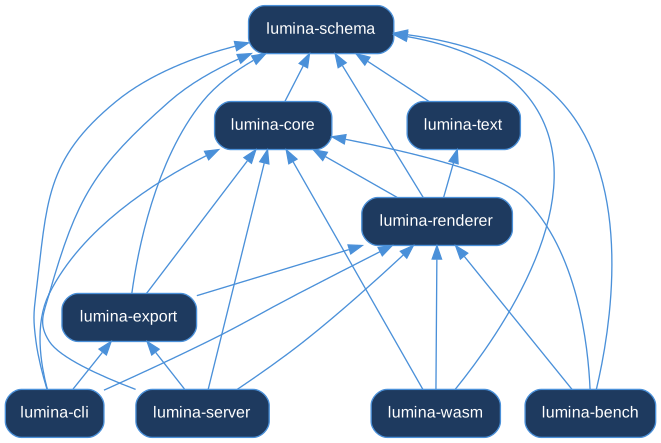
Generated from cargo metadata by docs/architecture/gen-diagrams.sh —
these are the real dependency edges, not an illustration.
lumina/
├── crates/
│   ├── lumina-schema/    LSF types + JSON Schema generation (schemars)
│   ├── lumina-core/      Scene graph, timeline evaluator, easings, LAB interp, event bus
│   ├── lumina-renderer/  Renderer trait → SkiaRenderer (CPU) + VelloRenderer (GPU)
│   ├── lumina-text/      Fontdue TTF rasterization + per-character font fallback
│   ├── lumina-export/    PNG sequence + MP4/WebM/GIF (FFmpeg stdin pipe)
│   ├── lumina-server/    Axum HTTP: /render /validate /patch /scene_patch /schema /objects
│   ├── lumina-wasm/      wasm-bindgen: render_frame, hit_test, process_event
│   └── lumina-bench/     Criterion benchmarks
├── sdks/{javascript,python}/
└── tools/lumina-cli/
Data flow
LSF JSON
  → Schema validator (structured errors with fix_suggestion)
  → Scene graph + timeline (keyframe evaluation, easing, LAB color)
  → Renderer (Skia CPU  | Vello GPU)
  → Export (PNG sequence | FFmpeg → MP4)   or   WASM canvas

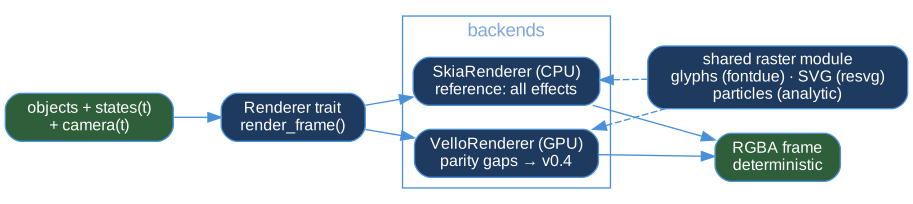

The event flow (host input → hit-test → event bus → playback outcome) is diagrammed in Events & Interactivity:

The Renderer trait
A backend implements render_frame, load_font, and optionally load_image /
set_time. The Exporter<R: Renderer> and the WASM engine are generic over it,
so adding a backend never touches the scene/timeline code. set_time is what
lets time-dependent assets (animated GIFs) and the particle simulator pick the
right state per frame.
Backend parity status
Skia (CPU) is the reference backend with full feature coverage. Vello
(GPU/wgpu, headless) reached object-type parity in v0.3.0 — text, LaTeX,
MathML, images, SVG and particles render on the GPU via a shared
rasterization module. Since v0.4, everything that decides what to draw —
parsing, geometry, ordering, transform math — lives once in the renderer's
common/ module and is consumed by both backends, and parity is enforced
by a cross-backend pixel-diff suite
(crates/lumina-renderer/tests/backend_parity.rs) that renders every
fixture scene on both backends in CI:
| Feature | Skia (CPU) | Vello (GPU) |
|---|---|---|
| All 17 object types | ✅ | ✅ |
| Text / LaTeX / MathML / Image / SVG / Particles | ✅ | ✅ (shared rasterizer) |
| Linear & radial gradients (fill and stroke) | ✅ | ✅ (shared geometry) |
Rounded rectangles (rx/ry) | ✅ | ✅ (shared geometry) |
draw_fraction stroke reveal | ✅ | ✅ (shared dash pattern) |
| Drop shadows / glow | ✅ | ✅ (shared blur pipeline) |
Explicit dash arrays on Line | ❌ | ❌ (schema field not yet implemented, TD-19) |
Every feature row is exercised by the parity suite; scenes render the same on either backend within the suite's tolerances (text carries a slightly wider budget until its two layout paths are unified, TD-18).
Key design choices
- Declarative first — scenes are data; nothing for an LLM to mis-sequence.
- State, not types, drives rendering — the timeline serializes each object's
properties to JSON and rebuilds a per-frame
statemap; new#[serde(default)]fields flow to the renderer with no core changes. - Deterministic — identical inputs yield identical pixels (including particles).
Performance
Lumina is fast for an animation engine — it is not magic, and it is honest about where time goes. Video rendering is bounded by per-frame rasterization plus FFmpeg encoding, not by the timeline math (scene-graph evaluation of a 2000-object scene is sub-millisecond).
Benchmarks
Run them yourself:
cargo bench -p lumina-bench
The suite covers:
timeline_eval—Timeline::get_state_aton synthetic 100 / 1000 / 2000-object scenes.render_frame— a single Skia frame at 1080p.easing_dispatch— overhead of the easing lookup (incl.cubic_bezier).
Record the numbers from your hardware in your fork's README rather than quoting someone else's machine.
Honest expectations
| Scenario | Realistic expectation |
|---|---|
| Headless 1080p60 render | seconds-to-minutes depending on object count + duration |
| FFmpeg encode | a few seconds on top of rendering |
| Browser playback (WASM, CPU) | 60 fps for simple scenes; fewer for heavy ones |
| Interactive HTML | no video encode → near-instant |
Export currently renders frames on a single thread and streams them to
FFmpeg; frame-parallel export (frames are independent) is planned for v0.5 —
see planning/ROADMAP.md.
Tips
- Group static sub-trees so transforms apply once.
- Keep
shadowand SVG rasterization opt-in; both are cached/bounded but cost more than flat fills. - For previews, use
--watch(renders a single mid-point frame) instead of full MP4 exports.
Schema Reference
The authoritative LSF schema is generated directly from the Rust types, so it is always in sync with the engine. There are two ways to obtain it:
From the running server
cargo run -p lumina-server &
curl localhost:3000/schema | jq           # full JSON Schema (draft-07, generated by schemars)
curl localhost:3000/objects | jq          # compact per-type required/optional registry
Generate a static copy
docs/scripts/gen-schema.sh # writes docs/src/generated/schema.json
The script boots the server, fetches /schema, and saves it. Embed or link that
file from your tooling for offline pre-validation and IDE autocompletion.
Tip: feed the schema (or the smaller
/objectsregistry) into an LLM's system prompt so generated scenes use correct property names on the first try. See the AI Integration Cookbook.
Contributing
Contributions are welcome. The bar is simple: the workspace stays green and new behavior is covered by a test.
The canonical, always-current guide lives in the repository: CONTRIBUTING.md — setup, the pre-PR verification gate, commit conventions, and code standards.
The short version:
cargo fmt --all --check
cargo clippy --workspace --exclude lumina-wasm --all-targets -- -D warnings
cargo test --workspace --exclude lumina-wasm --exclude lumina-bench
Rendering changes need a pixel-level test, new schema fields must be
#[serde(default)], and user-facing changes update CHANGELOG.md and the
relevant chapter of this book.
Building this book
cargo install mdbook
mdbook serve docs        # live preview at http://localhost:3000